Face Capture
The Mobile ID SDK provides a functionality that simplifies the process of obtaining a frame for biometry checks. To achieve it, we use face detection technology, and capture a frame with the user’s face. The live photo is then processed and checked against a liveness algorithm that will try to detect specific characteristics of spoofing attempts, returning a score that indicates if the person using the app is there or trying to impersonate someone else.
Initiate Face Capture
The Mobile ID SDK provides a complete set of functionalities that allows capturing and processing the user’s facial characteristics, and match them against the travel document’s photo. This helps ensuring that the user who is enrolling is the document’s owner. The biometric face capture should be the final step before creating a Digital ID in a remote system. If you only need to capture a frame with the user’s face for biometric quality validation and check against liveness algorithms, you can use the method biometricFaceCapture.
/**
 * Uses the device camera to capture a photo of the user face (selfie).
 *
 * Some tests will be run against this photo to ensure the photo quality and a liveness check verification.
 *
 * @param context Context
 * @param params [BiometricFaceCaptureParameters] configurations parameters.
 * @param resultLauncher [ActivityResultLauncher<Intent>] fragment or activity that will handle the results.
 */
fun biometricFaceCapture(
    context: Context,
    params: BiometricFaceCaptureParameters,
    resultLauncher: ActivityResultLauncher<Intent>
)
/// Uses the device camera to capture a photo of the user face (selfie). Some tests will be run against this photo to ensure the photo quality and a liveness check verification.
/// - Parameters:
///   - parameters: Configures the check liveness step.
///   - viewController: View controller that will present the face capture views.
///   - completionHandler: The completion handler to call when the face capture feature is finished.
///     This completion handler takes the following parameter:
///
///     Result<BiometricFaceCaptureReport, BiometricFaceCaptureError>
///     Where `BiometricFaceCaptureReport` contains  the results of the face capture
///     operation and `FaceCaptureReportError` the possible errors that may occur during the process.
    func biometricFaceCapture(parameters: BiometricFaceCaptureParameters, viewController: UIViewController, completionHandler: @escaping (Result<BiometricFaceCaptureReport, FaceCaptureReportError>) -> Void)
The SDK provides UI solutions for the capture process and photo preview, as shown in the images below. The use of the photo preview depends on the BiometricFaceCaptureParameters passed to the biometricFaceCapture method. Below is an example of that object:
@Parcelize
data class BiometricFaceCaptureParameters(
    val showPreview: Boolean,
    val showErrors Boolean,
    val frameFormat: FaceCaptureFrameFormat = FaceCaptureFrameFormat.OVAL
) : Parcelable
The FaceCaptureFrameFormat is an enum that shapes the frame where the face must be centered to take the selfie. Currently it has two options:
enum class FaceCaptureFrameFormat {
    SQUARE,
    OVAL
}
public struct BiometricFaceCaptureParameters {
    public let showPreview: Bool
    public let frameShape: BiometricFaceCaptureFrameOptions
    public let showErrors: Bool

    public init(showPreview: Bool,
            frameShape:BiometricFaceCaptureFrameOptions = .oval,
            showErrors: Bool)
The BiometricFaceCaptureFrameOptions is an enum that shapes the frame where the face must be centered to take the selfie. Currently it has two options:
public enum BiometricFaceCaptureFrameOptions {
    case oval
    case square
}
The showPreview parameter is a boolean that when set to true will show the user’s picture after taking it. You can also apply your app’s colors and fonts to these layout solutions, to keep your brand’s image consistent. See Custom styles.
This function is used to acquire a high-resolution selfie with a 9:7 aspect ratio. The photo will only be taken if the frame conforms to specific parameters that make sure the face is centered and not too far away, or too close.
Handle Result
Here's how you can get the result by using the result launcher that's passed as the final parameter:
private val faceCaptureResultLauncher = registerForActivityResult(FaceCaptureResultLauncher())
{ result: FaceCaptureActivityResult ->
    when {
        result.success -> onSuccess(result.faceCaptureReportSuccess)
        result.faceCaptureReportError?.userCanceled == true -> onUserCanceled()
        result.faceCaptureReportError?.termsAndConditionsAccepted == false -> onUserTermsAndConditionsRejected()
        result.faceCaptureReportError?.failedTests != null && result.faceCaptureReportError?.performedTests != null ->
            onFailedTests(
                result.faceCaptureReportError!!.performedTests!!,
                result.faceCaptureReportError!!.failedTests!!
            )
        else -> onBiometricFaceCaptureError()
    }
}
enrolment?.biometricFaceCapture(parameters: params, viewController: view) { result in
    switch result {
    case .success(let report):
        print("Face capture successful.")
        EnrolmentData.faceCapture = report.photo
        EnrolmentData.biometricFaceCaptureReport = report
        completion(.success(()))

    case .failure(let biometricFaceCaptureError):
        EnrolmentData.biometricFaceCaptureReport = nil

        if biometricFaceCaptureError.userCanceled {
            print("Face capture cancelled by user.")
            completion(.failure(biometricFaceCaptureError))
        } else {
            print(biometricFaceCaptureError.featureError.publicMessage)
            completion(.failure(biometricFaceCaptureError))
        }
    }
}
You will receive a model of the type FaceCaptureActivityResult that will contain the success data (in this case a FaceCaptureReportSuccess) or the error data.
data class FaceCaptureActivityResult(
    val faceCaptureReportSuccess: FaceCaptureReportSuccess?,
    val faceCaptureReportError: FaceCaptureReportError?
) {
    val success get() = faceCaptureReportSuccess != null
}
public struct BiometricFaceCaptureReport: Codable {

    /// Contains the list of biometric process tests performed in Orchestra during the biometric face capture process.
    public var performedTests: [CheckLivenessTest]

    /// Contains the list of biometric process tests failed in Orchestra during the biometric face capture process.
    public var failedTests: [CheckLivenessTest]

    /// Flag indicating if liveness check was performed or not during the biometric face capture process.
    public var performedLivenessCheck: Bool

    /// Biometric photo
    public var photo: UIImage?

    public init(photo: UIImage, performedTests: [CheckLivenessTest], failedTests: [String], performedLivenessCheck: Bool)
}
The FaceCaptureReportError has the following structure:
data class FaceCaptureReportError(
    val userCanceled: Boolean,
    val termsAndConditionsAccepted: Boolean,
    val featureError: FeatureError?,
    val failedTests: List<String>?,
    val performedTests: List<String>?
)
public class FaceCaptureReportError: Error {
    public var userCanceled: Bool
    public var termsAndConditionsAccepted: Bool
    public var featureError: FeatureError
    public var failedTests: [String]?
    public var performedTests: [String]?
}
The failed tests might include one or more of the following tests:
| Name | Description |
|---|---|
| FaceTooFarTest | Error indicating that the face was very far. |
| FaceTooCloseTest | Error indicating that the face was very close. |
| FaceNotCenteredTest | Error indicating that the face was not centered. |
| MultipleFacesDetectedTest | Error indicating that multiple faces were detected in the image. |
| FaceRotatedTest | Error indicating that the face was rotated in Z angle. A face with a positive Euler Z angle is rotated counter-clockwise relative to the camera. |
| NoFaceDetectedTest | Error indicating that no face was detected in the picture. |
| EyesClosedTest | Error indicating that the eyes are closed. |
| SmilingTest | Error indicating that the user was smiling. |
| FaceSidewaysTest | Error indicating that the face was rotated in Y angle. A face with a positive Euler Y angle is looking to the right of the camera, or looking to the left if negative. |
| FaceVerticalTest | Error indicating that the face was rotated in X angle. A face with a positive Euler X angle is facing upward. |
| MouthOpenTest | Error indicating that the user has the mouth open. |
| ImageBlurredTest | Error indicating that the image is blurred. |
| FaceCropFailedTest | Error indicating that the face crop failed. |
| LivenessCheckQualityTest | Error indicating that the liveness quality test failed. |
| LivenessCheckProbabilityTest | Error indicating that the liveness probability test failed. |
BiometricFaceCaptureCustomViews
The SDK provides default UI solutions for the document reader feature flow, as shown in the following images:
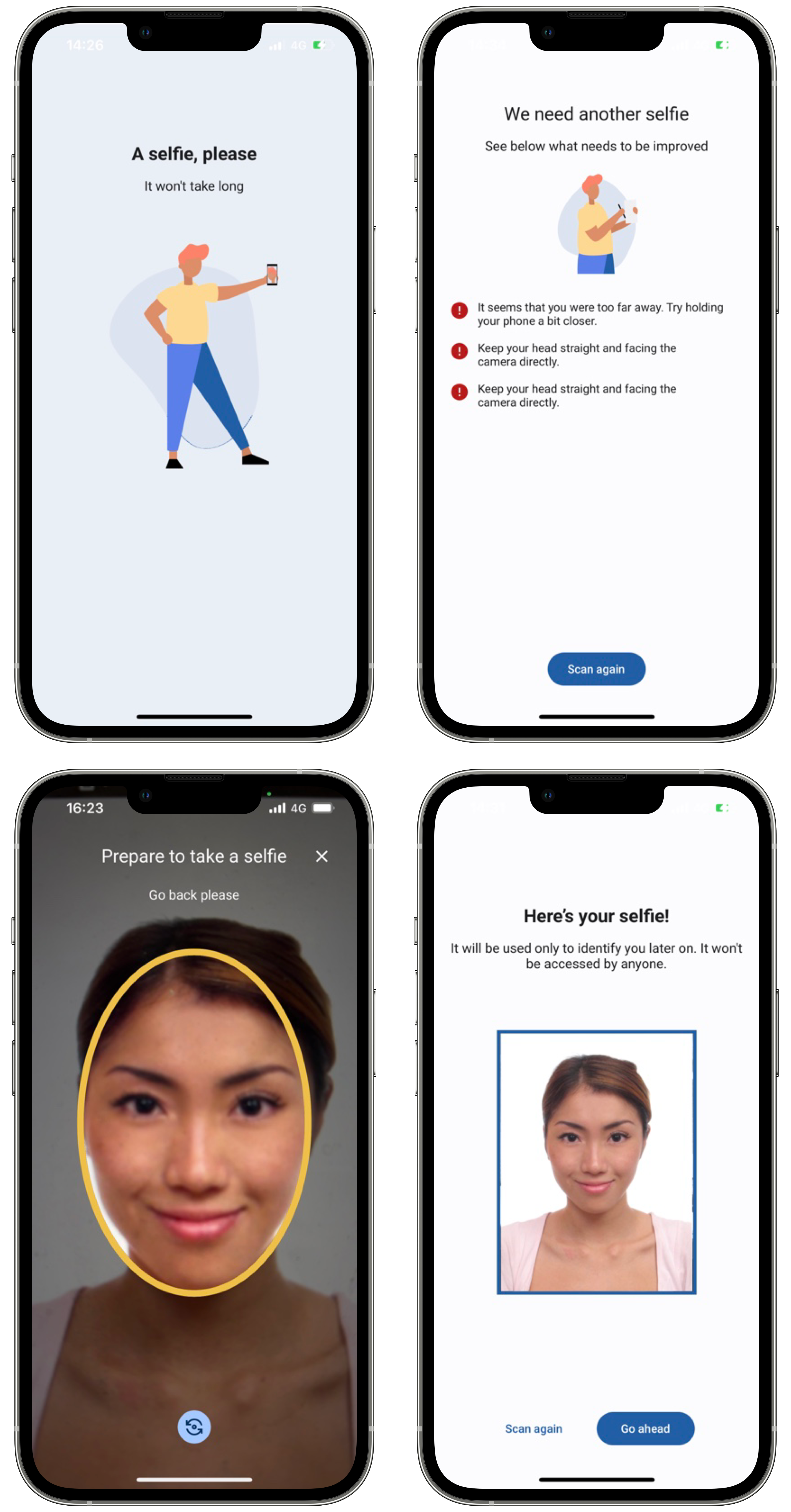
The use of the preview layout depends on the showPreview flag in the BiometricFaceCaptureParameters.
The use of the Errors layout depends on the showErrors flag in the BiometricFaceCaptureParameters.
@Parcelize
class BiometricFaceCaptureCustomViews(
    val loadingView: Class<out ICustomBiometricFaceCapture.LoadingView>? = null
) : Parcelable
public class EnrolmentViewRegister {
    ...

    public func registerBiometricFaceCaptureLoadingView(_ viewType: FaceCaptureLoadingViewType)
    ...
}
You can use your own custom views in the biometric face capture functionality. Your view must implement the SDK view interfaces. For example, if you want to add a custom loadingView, your view class must implement the ICustomBiometricFaceCapture.LoadingView interface.
In the customization tab you will also find examples to create your own custom views.