Boarding Pass
The boarding pass scan is used to extract encoded information in boarding passes that comply with the BCBP (Bar-Coded Boarding Pass) standard. The SDK is prepared to return the data from boarding passes in the following supported formats:
- Barcode PDF417;
- Aztec;
- QR code;
- DataMatrix.
Additionally, you can submit the boarding pass data to a back-end server platform when creating a subject.
Initiate Scan
Another functionality available in the enrolment facade is the bar-coded boarding pass scanning. This is helpful whenever your app needs to extract all encoded information in a printed or digital boarding pass if it was generated according to the international BCBP standard.
The mobile device will be able to scan boarding passes using the back camera. The SDK supports all the available formats in the IATA Bar-Coded Boarding Pass standard: PDF417, Aztec, QR code and DataMatrix. To start the barcode scanner, you must call the following method:
/**
* Scans a Bar Coded Boarding Pass (BCBP).
*
* @param context [Context] Activity holder
* @param params [BoardingPassScanParameters] required to start the boarding pass scan feature.
* @param resultLauncher [ActivityResultLauncher<Intent>] fragment or activity that will handle the results.
*/
fun scanBoardingPass(
    context: Context,
    params: BoardingPassScanParameters,
    resultLauncher: ActivityResultLauncher<Intent>
)
func scanBoardingPass(parameters: ScanBoardingPassParameters, viewController: UIViewController, completionHandler: @escaping (Result<BoardingPassFull, BoardingPassError>) -> Void)
The BoardingPassScanParameters has the following structure:
@Parcelize
data class BoardingPassScanParameters(
    val showPreview: Boolean,
    val showErrors: Boolean,
    val validate: Boolean
) : Parcelable
public struct ScanBoardingPassParameters {
    public let showPreview: Bool
    public let showErrors: Bool
    public let validateBoardingPass: Bool

    public init(showPreview: Bool,
                showErrors: Bool,
                validateBoardingPass: Bool)
}
The showPreview flag should be set to true if you want the SDK to present the details of the scanned boarding pass, the showErrors flag should be set to true if you want the SDK to present the default error screens to show the errors that occur during the features and the validate flag should be set to true if you want the SDK to validate the boarding pass data.
If you want to use your own boarding pass scanner, you can also provide the raw result of the scan and pass it to the facade’s parser method. It will return the BoardingPass object. The raw result must be passed to the BoardingPassData, which has to be included in the BoardingPassParserParameters.
From version 7 onwards there is a new way to parse a boarding pass, by giving us an image URI and if the boarding pass is detected in it, it will be parsed and you will receive a BoardingPass object without requiring to provide us the format.
/**
 * Parses a Bar Coded Boarding Pass (BCBP).
 *
 * @param context
 * @param params [BoardingPassStringParserParameters] required to start the boarding pass parser feature.
 * @param resultLauncher [ActivityResultLauncher<Intent>] fragment or activity that will handle the results.
 */
fun parseBoardingPass(
    context: Context,
    params: BoardingPassStringParserParameters,
    resultLauncher: ActivityResultLauncher<Intent>
)

/**
 * Parses an image of a Bar Coded Boarding Pass (BCBP).
 *
 * @param context
 * @param params [BoardingPassImageParserParameters] required to start the boarding pass image parser feature.
 * @param resultLauncher [ActivityResultLauncher<Intent>] fragment or activity that will handle the results.
 */
fun parseBoardingPass(
    context: Context,
    params: BoardingPassImageParserParameters,
    resultLauncher: ActivityResultLauncher<Intent>
)
func parseBoardingPass(parameters: ParseBoardingPassParameters, viewController: UIViewController, completionHandler: @escaping (Result<BoardingPass, BoardingPassParserError>) -> Void)
The BoardingPassParserParameters object has the following structure:
/**
* Parameters for each [BoardingPass] parser operation.
*
* @param showPreview if true, it will show a preview of [BoardingPass].
* @param showErrors if true, it will show a error screen that contains information regarding any error that happened during this feature.
* @param validate if true, it will perform validation of the [BoardingPass] fields.
*/
@Parcelize
open class BoardingPassParserParameters(
    open val showPreview: Boolean,
    open val showErrors: Boolean,
    open val validate: Boolean
) : Parcelable

/**
* Parameters for each [BoardingPass] parser operation.
*
* @param boardingPassData [BoardingPassData] that will that has the barcode raw data and format to be parsed to a [BoardingPass].
*/
@Parcelize
data class BoardingPassStringParserParameters(
    val boardingPassData: BoardingPassData,
    override val showPreview: Boolean,
    override val showErrors: Boolean,
    override val validate: Boolean
) : BoardingPassParserParameters(
    showPreview,
    showErrors,
    validate
)

/**
* Parameters for each [BoardingPass] parser operation.
*
* @param uri URI to an image file of a [BoardingPass] that will be analyzed and parsed.
*/
@Parcelize
data class BoardingPassImageParserParameters(
    val uri: Uri,
    override val showPreview: Boolean,
    override val showErrors: Boolean,
    override val validate: Boolean
) : BoardingPassParserParameters(
    showPreview,
    showErrors,
    validate
)
public struct ParseBoardingPassParameters {
    public let showPreview: Bool
    public let showErrors: Bool
    public let validateBoardingPass: Bool
    public let boardingPassData: BoardingPassData
    public let boardingPassImage: UIImage?

    public init(showPreview: Bool,
                showErrors: Bool,
                validateBoardingPass: Bool,
                boardingPassData: BoardingPassData,
                boardingPassImage: UIImage?)
}
The BoardingPassData is a model where you will have to provide the raw barcode scan result and the barcode format. Below is the model structure:
@Parcelize
data class BoardingPassData(
    val rawBarcodeData: String,
    val barcodeFormat: BarcodeFormat
) : Parcelable
public struct BoardingPassData {
    public let rawBarcodeData: String
    public let barcodeFormat: BarcodeFormat

    public init(rawBarcodeData: String, barcodeFormat: BarcodeFormat)
}
BarcodeFormat is an enumeration and it contains the following cases.
enum class BarcodeFormat(val value: String) {
    AZTEC("AZTECCODE"),
    PDF417("PDF417"),
    QR_CODE("QR_CODE"),
    DATA_MATRIX("DataMatrix")
}
public enum BarcodeFormat: String {
    case aztec
    case pdf417
    case qrCode
    case dataMatrix
}
Handle Result
Here's how you can get the result by using the result launcher that's passed as the final parameter:
private val boardingPassResultLauncher = registerForActivityResult(BoardingPassResultLauncher())
{ result: BoardingPassActivityResult ->
    when {
        result.success -> presenter.storeBoardingPass(result.boardingPass)
        result.boardingPassError?.userCanceled == true -> onUserCanceled()
        result.boardingPassError?.termsAndConditionsAccepted == true -> onTermsAndConditionsRejecetd()
        else -> onBoardingPassScanError()
    }
}
You will receive a model of the type BoardingPassActivityResult that will contain the success data (in this case a BoardingPass) or the error data.
data class BoardingPassActivityResult(
    val boardingPass: BoardingPass?,
    val boardingPassError: BoardingPassError?
) {
    val success get() = boardingPass != null
}
The BoardingPassError has the following structure:
data class BoardingPassError(
    val userCanceled: Boolean,
    val termsAndConditionsAccepted: Boolean,
    val featureError: FeatureError?
)
These method’s completion handler passes a result
let parameters = ScanBoardingPassParameters(
            showPreview: true, showErrors: true, validateBoardingPass: preferences.useIataStandards())

 self.enrolment.scanBoardingPass(parameters: parameters, viewController: vc) { [weak self] result in
        switch result {
        case .success(let boardingPass):
            // Handle Success
        case .failure(let error):
            if error.userCanceled {
                print("onUserCancel")
            } else {
                print(error.featureError.publicMessage)
            }
        }
    }
public class BoardingPassError: Error {
    public var userCanceled: Bool
    public var termsAndConditionsAccepted: Bool
    public var featureError: FeatureError
}
In case of success, the BoardingPass has the following structure:
@Parcelize
data class BoardingPass(
    val rawBoardingPass: String,
    val barcodeType: String,
    val expiryDate: Date,
    val formatCode: String,
    val numberOfLegs: Int,
    val passengerName: String,
    val electronicTicketIndicator: String,
    val beginningOfVersionNumber: String? = null,
    val versionNumber: Int? = null,
    val passengerDescription: Int? = null,
    val checkInSource: String? = null,
    val boardingPassSource: String? = null,
    val boardingPassDate: String? = null,
    val documentType: String? = null,
    val boardingPassIssuerDesignator: String? = null,
    val baggageTagNumber: String? = null,
    val firstNonConsecutiveBaggageTagNumber: String? = null,
    val secondNonConsecutiveBaggageTagNumber: String? = null,
    val securityDataBeginning: String? = null,
    val legs: List<Leg>
) : Parcelable
public struct BoardingPass: Codable {
    public let formatCode: String
    public let barcodeType: String
    public let numberOfLegsEncoded: Int
    public let passengerName: String
    public let electronicTicketIndicator: String?
    public let rawBoardingPass: String
    public let expiryDate: Date
    public let beginningOfVersionNumber: String?
    public let versionNumber: Int?
    public let passengerDescription: String?
    public let checkInSource: String?
    public let boardingPassSource: String?
    public let boardingPassDateString: String?
    public let documentType: String?
    public let boardingPassIssuerDesignator: String?
    public let baggageTagNumber: String?
    public let firstNonConsecutiveBaggageTagNumber: String?
    public let secondNonConsecutiveBaggageTagNumber: String?
    public let securityDataBeginning: String?
    public let legs: [Leg]
}
The Leg has the following structure:
@Parcelize
data class Leg(
    val legOrder: Int,
    val operatingCarrierPnrCode: String,
    val originAirportCode: String,
    val destinationAirportCode: String,
    val operatingCarrierDesignator: String,
    val flightNumber: String,
    val flightDate: String,
    val compartmentCode: String,
    val seatNumber: String,
    val checkInSequenceNumber: String,
    val passengerStatus: String,
    val airlineNumericCode: String? = null,
    val serialNumber: String? = null,
    val selecteeIndicator: Int? = null,
    val internationalDocumentVerification: Int? = null,
    val marketingCarrierDesignator: String? = null,
    val frequentFlyerAirlineDesignator: String? = null,
    val frequentFlyerNumber: String? = null,
    val idAdIndicator: String? = null,
    val freeBaggageAllowance: String? = null,
    val fastTrack: String? = null
) : Parcelable
public struct Leg: Codable {
    public let flightNumber: String?
    public let frequentFlyerNumber: String?
    public let documentSerialNumber: String?
    public let airlineNumericCode: String?
    public let passengerStatus: String?
    public let sequenceNumber: String?
    public let seatNumber: String?
    public let compartmentCode: String?
    public let flightDate: String?
    public let legOrder: Int?
    public let carrierDesignator: String?
    public let destinationAirport: String?
    public let originAirport: String?
    public let carrierPnrCode: String?
    public let frequentFlyerAirlineDesignator: String?
    public let selecteeIndicator: Int?
    public let internationalDocumentVerification: Int?
    public let marketingCarrierDesignator: String?
    public let idAdIndicator: String?
    public let freeBaggageAllowance: String?
    public let fastTrack: String?
}
Custom Views
The SDK provides default UI solutions for the boarding pass feature flow, as shown in the following images:
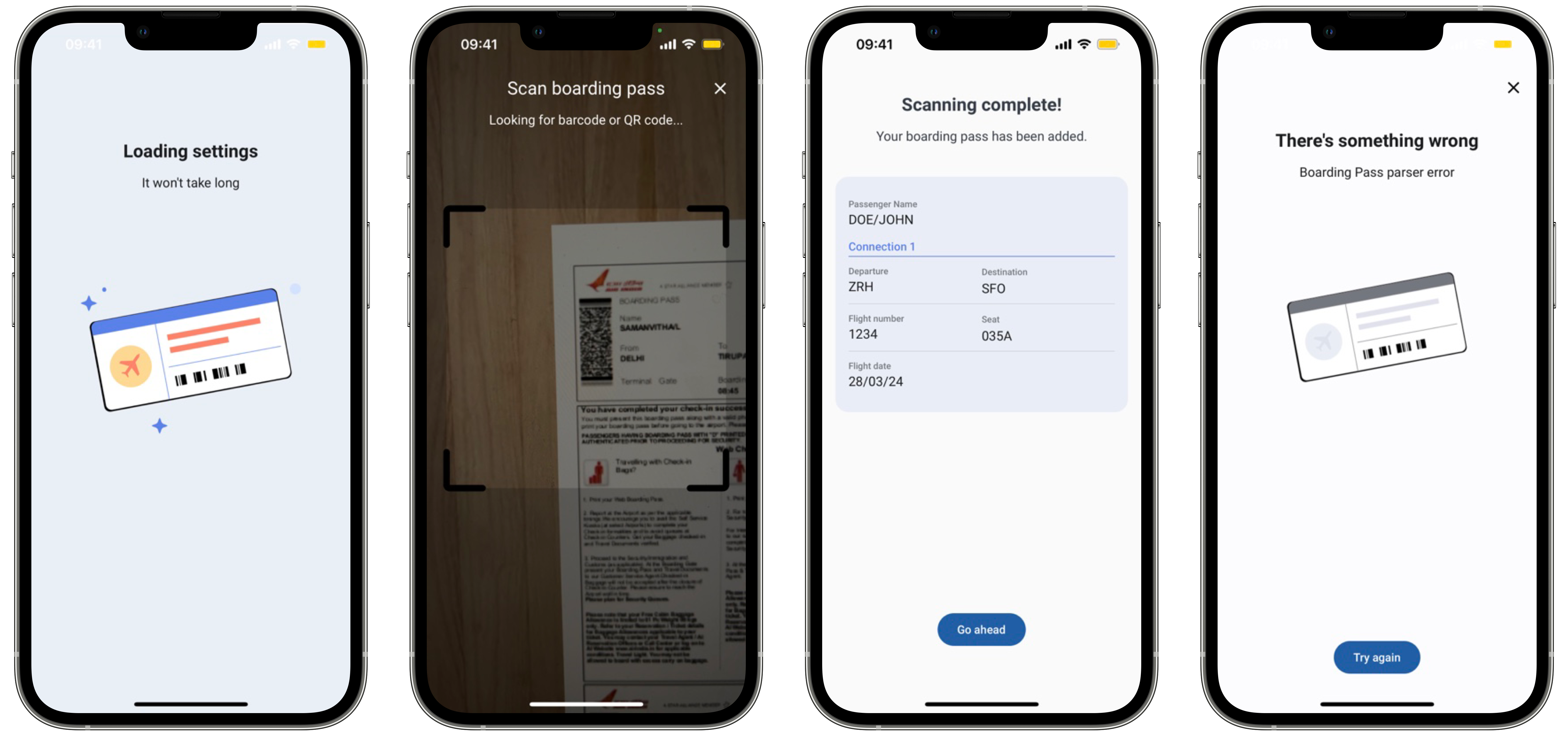
The use of the preview layout depends on the showPreview flag in the BoardingPassScanParameters.
You can also apply your app’s colors and fonts to these layout solutions, to keep your brand’s image consistent. Check Customization tab to learn more about branding of each view.
@Parcelize
class BoardingPassCustomViews(
    val loadingView: Class<out ICustomBoardingPass.LoadingView>? = null
) : Parcelable
Our SDK also allows you to pass your own custom views. The only requirement is that your view must implement the SDK view interfaces. For example, if you want to add a custom loading view, your view class must implement the ICustomBoardingPass.LoadingView interface.
public class EnrolmentViewRegister {
    ...
    public func registerBoardingPassScannerLoadingView(_ viewType: BoardingPassLoadingViewType)

    ...
}
Our SDK also allows you to pass your own custom views. The only requirement is that your view must implement the SDK view protocols. For example, if you want to add a custom loading view, your view class must implement the BoardingPassLoadingViewType.
In the customization tab you will also find examples to create your own custom views.