Document Reader
The document reader is used to extract the user’s document information and perform all necessary security validations. This functionality works in two steps: the MRZ of the travel document is scanned (using the device's camera) and then, if it is an electronic document (i.e. with a chip), and the client app indicated that it wants to read the chip, the user is prompted to place the mobile device over the travel e-Document in order to perform a RFID scan to extract available data.
Configure
To use this feature, you must provide the DocumentReaderConfig to the EnrolmentBuilder like the following example:
val builder: EnrolmentBuilder = EnrolmentBuilder
    .of(context, config)
    .withDocumentReaderConfig(documentReaderConfig)
    .build()
var enrolment: EnrolmentProtocol = EnrolmentBuilder
        .of(enrolmentConfig: enrolmentConfig)
        .with(documentReaderConfig: documentReaderConfig)
        .with(viewRegister: viewRegister)
        .build()
The DocumentReaderConfig has the following structure:
@Parcelize
data class DocumentReaderConfig(
  val multipageProcessing: Boolean,
  val databaseId: String
) : Parcelable
- multipageProcessing: controls the workflow for documents that might need to have different pages scanned;
- databaseId: specify database Id to be used with the document reader functionality (provided by Regula);
public struct DocumentReaderConfig {
    public let multipageProcessing: Bool
    public let databaseID: String
    public let databasePath: String?
    public let scannerTimeout: TimeInterval

    public init(multipageProcessing: Bool, databaseID: String, databasePath: String? = nil, scannerTimeout: TimeInterval = 30)
}
- multipageProcessing: controls the workflow for documents that might need to have different pages scanned;
- databaseId: specify database Id to be used with the document reader functionality (provided by Regula);
- databasePath: Database path for .dat file to initialize Regula documents database. Default value is
nil. - scannerTimeout: Document scan timeout, in seconds. Default value is
30seconds.
Initiate Scan
The document reader functionality enables the client application to extract and validate data from travel documents from different countries, by calling the readDocument method.
/**
 * Reads the information contained in a personal document.     *
 *
 * @param context Context
 * @param params [DocumentReaderParameters] with some configurations for the document reader feature.
 * @param resultLauncher [ActivityResultLauncher<Intent>] fragment or activity that will handle the results.
 */
fun readDocument(
    context: Context,
    params: DocumentReaderParameters,
    resultLauncher: ActivityResultLauncher<Intent>
)
    func readDocument(parameters: ReadDocumentParameters,
                      viewController: UIViewController,
                      completionHandler: @escaping (Result<DocumentReaderReport, DocumentReaderError>) -> Void) throws
This method can perform a full travel document read in two steps:
- MRZ scan: using the device's camera, the SDK reads the MRZ section of the travel document and extracts information from it. During this step, and if available, a document picture is also scanned and saved.
- RFID scan: the user is prompted to move the device over the e-Document and, using NFC, the chip data is scanned. This step is available only for electronic documents (i.e. with a chip) and is optional (i.e. the client app must indicate that it wants to read the document's chip, setting the readRFID flag to true when calling the readDocument method). You can use specific parameters when using this functionality for passport scanning. Below is an example on how to provide those parameters:
data class DocumentReaderParameters(
    val showPreview: Boolean,
    val showErrors: Boolean,
    val rfidRead: Boolean,
    val showSecurityCheck: Boolean = true,
    val showRFIDStatus: Boolean = false,
    val mrzReadTimeout: Long = TimeUnit.SECONDS.toMillis(30),
    val rfidReadTimeout: Long = TimeUnit.SECONDS.toMillis(30),
) : Parcelable {
init {
    require(!(mrzReadTimeout < TimeUnit.SECONDS.toMillis(10) || mrzReadTimeout > TimeUnit.SECONDS.toMillis(60))) { "mrzReadTimeout value must be between 10 and 60 seconds." }
    require(!(rfidReadTimeout < TimeUnit.SECONDS.toMillis(10) || rfidReadTimeout > TimeUnit.SECONDS.toMillis(60))) { "rfidReadTimeout value must be between 10 and 60 seconds." }
}
public struct ReadDocumentParameters {
    public let showPreview: Bool
    public let readRFID: Bool
    public let showRFIDStatus: Bool
    public let scannerTimeout: TimeInterval
    public let rfidTimeout: TimeInterval
    public let showErrors: Bool

    public init(showPreview: Bool,
                readRFID: Bool,
                showRFIDStatus: Bool = false,
                scannerTimeout: TimeInterval = 30,
                rfidTimeout: TimeInterval = 30,
                showErrors: Bool)
}
Both mrzReadTimeout and rfidReadTimeout values must be between 10 and 60 seconds, otherwise an illegal argument exception will be thrown. It's no longer possible to disable either of this timeout.
If both scans are enabled and the RFID scan fails for some reason, the MRZ scan data is always returned as the default set of data read from the travel document. The mrzReadTimeout is the timeout value in seconds before closing the document reading screen if no document is scanned during this period. The functionality provides UI solution for both document scanning and returned data preview (as shown in the following images), with an option to retry the scan. The preview is only shown if the flag showPreview in the DocumentReaderParameters is set to true when calling the readDocument method. The showRFIDStatus is a flag to show an icon in the preview screen that indicates if the document was scanned using RFID and properly validated and authenticated. The showSecurityCheck is used to activate a security mechanism to protect user data in the preview screen. If it is true, the device will use its own locking mechanism in this screen and the user will need to authenticate and unlock his device to check the preview data (for example, using fingerprint or face ID).
Handle Result
Here is how you can get the document reader report and handle the result for document reader:
You can get the result by using the result launcher that's passed as the final parameter:
private val documentReaderResultLauncher = registerForActivityResult(DocumentReaderResultLauncher())
{ result: DocumentReaderActivityResult ->
    when {
        result.success -> onSuccess(result.documentReaderReport)
        result.documentReaderError?.userCanceled == true -> userCancelled()
        result.documentReaderError?.termsAndConditionsAccepted == false -> onTermsAndConditionsRejected()
        else -> onDocumentReaderError()
    }
}
You will receive a model of the type DocumentReaderActivityResult that will contain the success data (in this case a DocumentReaderReport) or the error data.
data class DocumentReaderActivityResult(
    val documentReaderReport: DocumentReaderReport?,
    val documentReaderError: DocumentReaderError?
) {
    val success get() = documentReaderReport != null
}
The DocumentReaderError has the following structure:
data class DocumentReaderError(
    val userCanceled: Boolean,
    val termsAndConditionsAccepted: Boolean,
    val featureError: FeatureError?,
)
self.enrolment.readDocument( parameters: parameters, viewController: view) { [weak self] result in
    switch result {
        case .success(let documentReaderReport):
           // handle DocumentReaderReport

        case .failure(let error):
            EnrolmentData.shared.documentReaderReport = nil
            if error.userCanceled {
                print("onUserCancel")
            } else {
                print(error.featureError.publicMessage)
            }
        }
    }
}
public class DocumentReaderError: Error {
    public var userCanceled: Bool
    public var termsAndConditionsAccepted: Bool
    public var featureError: FeatureError
}
Document Reader Report
@Parcelize
data class DocumentReaderReport(
    val documentData: DocumentData,
    val status: List<DocumentDataStatus>,
    val rfidStatus: RFIDStatus,
    val documentType: DocumentType
) : Parcelable
public struct DocumentReaderReport: Codable {
    public let documentData: DocumentData
    public let documentType: DocumentType
    public let documentRFIDStatus: DocumentRFIDStatus
    public let documentStatuses: [DocumentDataStatus]
}
The DocumentData contains the document data. You can check the structure here:
data class DocumentData(
    val hasChip: Boolean,
    val documentNumber: DocumentDataField?,
    val dateOfExpiry: Date?,
    val dateOfBirth: Date?,
    val age: DocumentDataField?,
    val personalNumber: DocumentDataField?,
    val sex: DocumentDataField?,
    val issuingStateCode: DocumentDataField?,
    val issuingState: DocumentDataField?,
    val dateOfIssue: Date?,
    val nationalityCode: DocumentDataField?,
    val nationality: DocumentDataField?,
    val givenNames: DocumentDataField?,
    val surname: DocumentDataField?,
    val surnameAndGivenNames: DocumentDataField?,
    val documentClassCode: DocumentDataField?,
    val documentNumberCheckDigit: DocumentDataField?,
    val dateOfBirthCheckDigit: DocumentDataField?,
    val dateOfExpiryCheckDigit: DocumentDataField?,
    val optionalDataCheckDigit: DocumentDataField?,
    val finalCheckDigit: DocumentDataField?,
    val optionalData: DocumentDataField?,
    val cardAccessNumber: DocumentDataField?,
    val remainderTerm: DocumentDataField?,
    val mrzType: DocumentDataField?,
    val mrzStrings: DocumentDataField?,
    val mrzStringsWithCorrectCheckSums: DocumentDataField?,
    val dsCertificateSubject: DocumentDataField?,
    val dsCertificateValidFrom: DocumentDataField?,
    val dsCertificateValidTo: DocumentDataField?,
    val documentImagePath: String,
    val portraitPhotoPath: String,
    val documentTypeData: DocumentTypeData?
)
data class DocumentDataField(
    val value: String,
    var status: DocumentDataFieldStatus
)
enum class DocumentDataFieldStatus {
    /**
     * field was verified and passed verification successfully.
     */
    OK,

    /**
     * verification of the field has failed for some non-specified reason, either it wasn't read correctly or
     * the check digit verification failed. These data are not reliable and should not be used.
     */
    ERROR,

    /**
     * field was not verified for correctness.
     */
    NOT_CHECKED
}
@Parcelize
    data class DocumentTypeData(
    val type: DocumentType,
    val infoVal: DocumentTypeInfo?
) : Parcelable
enum class DocumentType {
    PASSPORT,
    VISA,
    ID_CARD,
    DRIVING_LICENSE,
    UNKNOWN
}
@Parcelize
data class DocumentTypeInfo(
    val documentId: Int,
    val dTypeId: Int,
    val documentName: String?,
    val icaoCode: String?
) : Parcelable
The DocumentDataStatus, RFIDStatus and DocumentType are enums that have the following possibilities:
enum class DocumentDataStatus {
    OK,
    VALIDATION_ERROR,
    EXPIRED_DOCUMENT,
    RFID_PASSIVE_AUTHENTICATION,
    MRZ_RFID_MISMATCH,
    RFID_TIMEOUT,
    RFID_PERMISSION_NOT_GRANTED,
    RFID_TAG_NOT_FOUND,
    RFID_NFC_NOT_SUPPORTED,
    RFID_GENERIC_ERROR,
    USER_SKIPPED_RFID
}
enum class RFIDStatus {
    UNDEFINED,
    SUCCESS,
    ERROR
}
public class DocumentData: Codable {
    /// Indicates if the document has chip.
    public var hasChip: Bool = false
    /// Document number.
    public var documentNumber: DocumentDataField?
    /// Expiry date of the document.
    public var dateOfExpiry: Date?
    /// Date of birth.
    public var dateOfBirth: Date?
    /// Age.
    public var age: DocumentDataField?
    /// Personal number.
    public var personalNumber: DocumentDataField?
    /// Sex.
    public var sex: DocumentDataField?
    /// Issuing state code in compliance with 3166-1 standard (ICAO doc 9303).
    public var issuingStateCode: DocumentDataField?
    /// Human-readable name of the issuing country, according to the current locale.
    public var issuingState: DocumentDataField?
    /// Date of issue.
    public var dateOfIssue: Date?
    /// Nationality code in compliance with ISO3166-1 standard (ICAO doc 9303).
    public var nationalityCode: DocumentDataField?
    /// Human-readable name of nationality country of the document holder, according to the current locale.
    public var nationality: DocumentDataField?
    /// Given name(s).
    public var givenNames: DocumentDataField?
    /// Surname.
    public var surname: DocumentDataField?
    /// Surname and given name(s).
    public var surnameAndGivenNames: DocumentDataField?
    /// Document class code.
    public var documentClassCode: DocumentDataField?
    /// Check digit for document number.
    public var documentNumberCheckDigit: DocumentDataField?
    /// Check digit for date of birth.
    public var dateOfBirthCheckDigit: DocumentDataField?
    /// Check digit for document expiry date.
    public var dateOfExpiryCheckDigit: DocumentDataField?
    /// Check digit for optional data.
    public var optionalDataCheckDigit: DocumentDataField?
    /// Final check digit (for the whole MRZ).
    public var finalCheckDigit: DocumentDataField?
    /// Optional data.
    public var optionalData: DocumentDataField?
    /// Access number for RFID chip.
    public var cardAccessNumber: DocumentDataField?
    /// Months to expire.
    public var remainderTerm: DocumentDataField?
    /// MRZ type (ID-1 – 0, ID-2 – 1, ID-3 – 2).
    public var mrzType: DocumentDataField?
    /// MRZ lines.
    public var mrzStrings: DocumentDataField?
    /// MRZ with correct checksums.
    public var mrzStringsWithCorrectCheckSums: DocumentDataField?
    /// Textual information about the document issuer.
    public var dsCertificateSubject: DocumentDataField?
    /// Start date of the DS-certificate validity.
    public var dsCertificateValidFrom: DocumentDataField?
    /// Expiration date of the DS-certificate.
    public var dsCertificateValidTo: DocumentDataField?

    /// Model that wraps information about the document type
    public var documentTypeData: DocumentTypeData?

    /// Photo of the document owner.
    public var portrait: UIImage? {
        return portraitData.flatMap { UIImage(data: $0) }
    }

    /// Document image.
    public var documentImage: UIImage? {
        return documentImageData.flatMap { UIImage(data: $0) }
    }

    var documentImageData: Data?

    var portraitData: Data?
}
public struct DocumentDataField: Codable {
    public var value: String
    public var status: DocumentDataFieldStatus
}
public enum DocumentDataFieldStatus: String, Codable {
    /// The field was verified and passed verification successfully.
    case ok
    /// The verification of the field has failed for some non-specified reason, either it wasn't read correctly or the check digit verification failed.
    /// These data are not reliable and should not be used.
    case error
    /// The field was not verified for correctness.
    case notChecked
}
public struct DocumentTypeData: Codable {
    /// Type of document, ex: Passport, Visa, etc.
    public let type: DocumentType
    /// Model that contains information about the document type
    public let info: DocumentTypeInfo?
}
public struct DocumentTypeInfo: Codable {
    /// Document type id
    public let dTypeId: Int
    /// Document Name
    public let documentName: String?
    /// Country code
    public let icaoCode: String?
}
public enum DocumentType: String, Codable {
    case passport
    case visa
    case idCard
    case drivingLicense
    case unknown
}
The DocumentRFIDStatus, DocumentDataStatus and DocumentType are enums that have the following possibilities:
public enum DocumentType: String, Codable {
    case passport
    case visa
    case idCard
    case drivingLicense
    case unknown
}
public enum DocumentRFIDStatus: String, Codable {
    case error
    case success
    case undefined
}
public enum DocumentDataStatus: String, Codable {
    case ok
    case validationError
    case expiredDocument
    case rfidPassiveAuthentication
    case mrzRFIDMismatch
    case rfidNFCNotSupported
    case rfidGenericError
    case rfidTimeouError
    case userSkipedRfid
}
DocumentReaderCustomViews
The SDK provides default UI solutions for the document reader feature flow, as
shown in the following images:
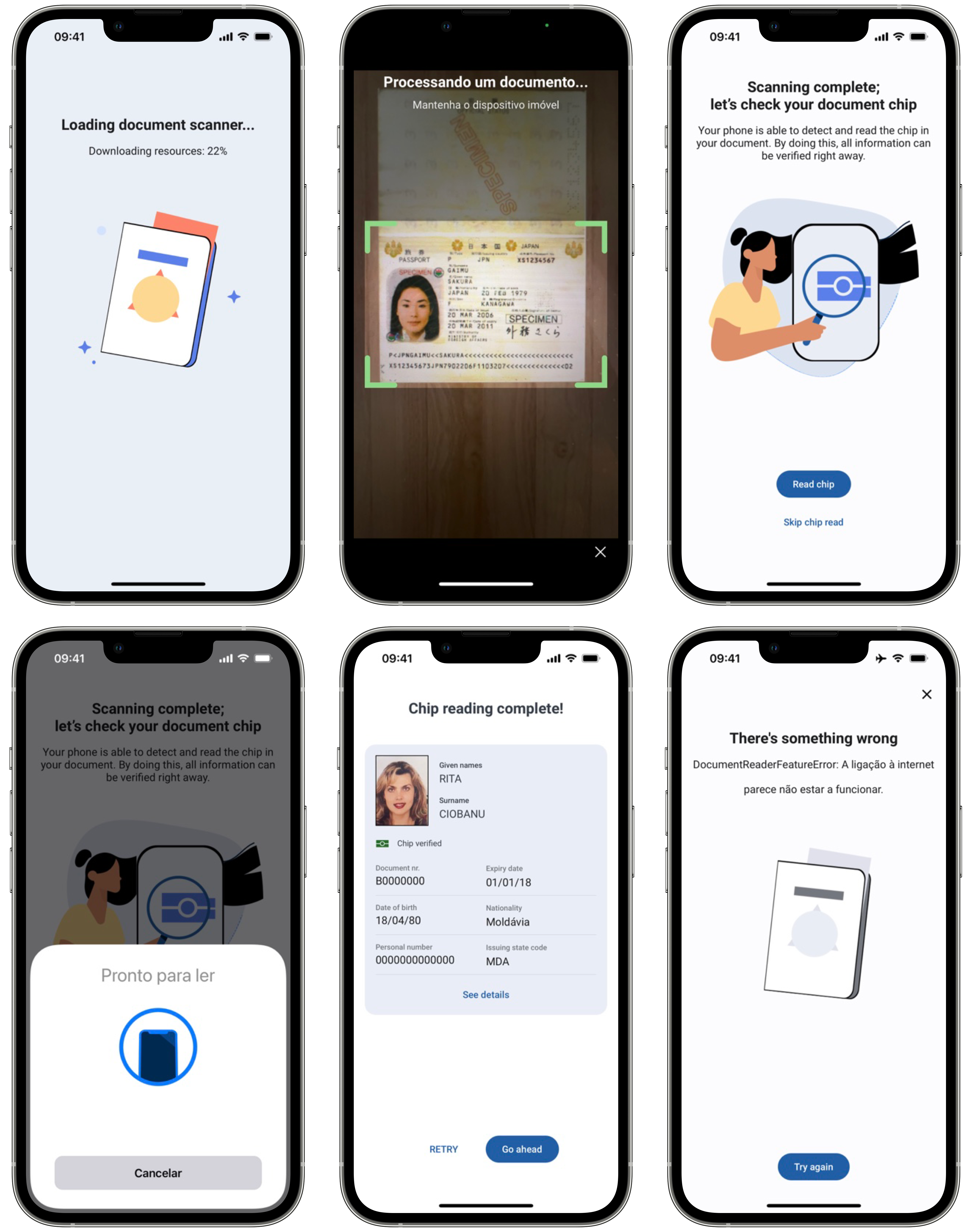
The use of the preview layout depends on the showPreview flag in the DocumentReaderParameters.
The use of the rfid related layouts depends on the rfidRead flag in the DocumentReaderParameters.
The use of the error layout depends on the showErrors flag in the DocumentReaderParameters.
You can also apply your app’s colors and fonts to these layout solutions, to keep your brand’s image consistent. Check Customization tab to learn more about branding of each view.
@Parcelize
class DocumentReaderCustomViews(
    val loadingView: Class<out ICustomDocumentReader.LoadingView>? = null,
    val rfidInstructionsView: Class<out ICustomDocumentReader.RfidInstructionsView>? = null,
    val rfidSearchView: Class<out ICustomDocumentReader.RfidSearchView>? = null,
    val rfidProcessView: Class<out ICustomDocumentReader.RfidProcessView>? = null,
) : Parcelable
public class EnrolmentViewRegister {
    ...
    // MARK: - Document Reader
    public func registerDocumentReaderRFIDInstructionsView(_ viewType: DocumentReaderRFIDInstructionsViewType)
    public func registerDocumentReaderLoadingView(_ viewType: DocumentReaderLoadingViewType)
    ...
}
Our SDK also allows you to pass your own custom views. The only requirement is that your view must implement the SDK view protocols. For example, if you want to add a custom loading view, your view class must implement the DocumentReaderLoadingViewType.
In the customization tab you will also find examples to create your own custom views.